An AI agent reproduced five image-heavy pages of an OpenStax chapter five different ways — and recorded the real InDesign canvas doing the work, failures and all.


The target is one chapter of OpenStax Concepts of Biology — Creative-Commons, so the outputs are safe to share. It has a full-bleed photo, multi-column prose, colored callout boxes and figure captions.
InDesign is hard to automate against: it's proprietary, it has no headless desktop mode, and the book's fonts (IBM Plex Sans, Mulish) aren't installed by default — so the app silently substitutes and the layout drifts.
Reproduce the first five pages as closely as possible inside InDesign — and measure how close each approach gets, and what it costs.
⤢ click to zoom
⤢ click to zoomPyMuPDF walks the PDF once and records every text span, image and fill into a single layout_spec.json — 173 text runs, 7 images, 9 fills. The same structured understanding feeds all five engines.
Decoupling “understand the source” from “draw it” is what makes the five engines comparable — and lets you swap engines without touching extraction.
Connected over COM, the agent places each element in order — fills, then the photograph, then the headline, the outline, the body. This is the genuine Adobe InDesign 2026 canvas updating after every placement.
Captured by attaching to a visible InDesign instance, building element-by-element with redraw on, and screenshotting the layout window after each step.
Each track consumes the identical extraction spec. Three scripted engines tie at the top; two specialist approaches trail — and each one taught us something. Click any clip to zoom and play.
The most Python-native path: Dispatch("InDesign.Application.2026"), then place rectangles, images and text frames directly. The most controllable engine — and the one that hit the most setup snags before it worked.
Why it scored well: it places images and fills at exact coordinates (IoU 98–100) and applies the real installed fonts, so only fine text reflow separates it from the source.
p1 ⇄
p3 ⇄
p5 ⇄The same build logic run inside InDesign via app.doScript. Identical DOM, byte-identical output to B1.
Why it's the easiest: it runs inside the licensed app — no COM ProgID hunt, no makepy, named enums that read like the docs, and the fastest build. The lowest-friction way to reach ~91%.
The same DOM behind an async wall: require('indesign'), enums on the module, no return marshaling. Ported mechanically from B2; the output is byte-identical.
Why choose it: not for fidelity (it matches B1/B2) but for distribution — UXP is Adobe's strategic runtime for shippable panels and plugins.
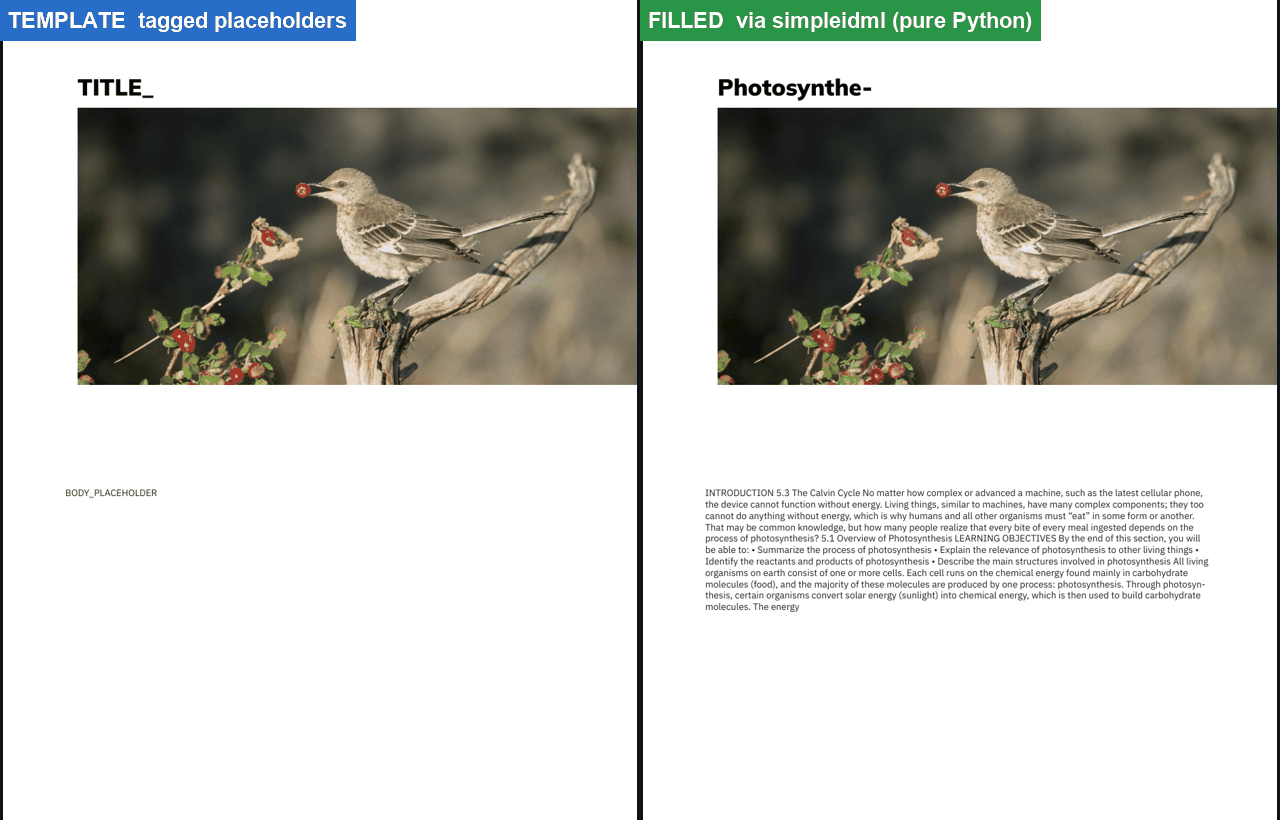
Inject variable content into a fixed, pre-tagged IDML template — in pure Python, with no running InDesign. You see the placeholder frames + fixed photo, then the text injected by import_xml.
Why it trails: it can't reproduce free-form structure — every distinct element would need its own tagged slot. A template tool, not a layout engine: superb for catalogs and mail-merge, wrong for an arbitrary page.
The Blender-style idea: let the agent see its output, compare to the source, and correct — round after round. Here, rounds 0 → 1 → 2 rebuilt live from a vision-only guess.
Why it trails: it fixes gross layout (it caught a distorted photo) but composite only crawled 0.601 → 0.608. Matching exact text reflow by eye is the wall, and each round costs a 70–180 s rebuild.
Six concrete failures, each with a clean root cause and a fix. This is where the real work was.

The page exported 10× too big, everything crammed in the corner.
PageWidth = 612 was read as 612 picas = 7344 pt.
Set MeasurementUnit = idPoints before any geometry.

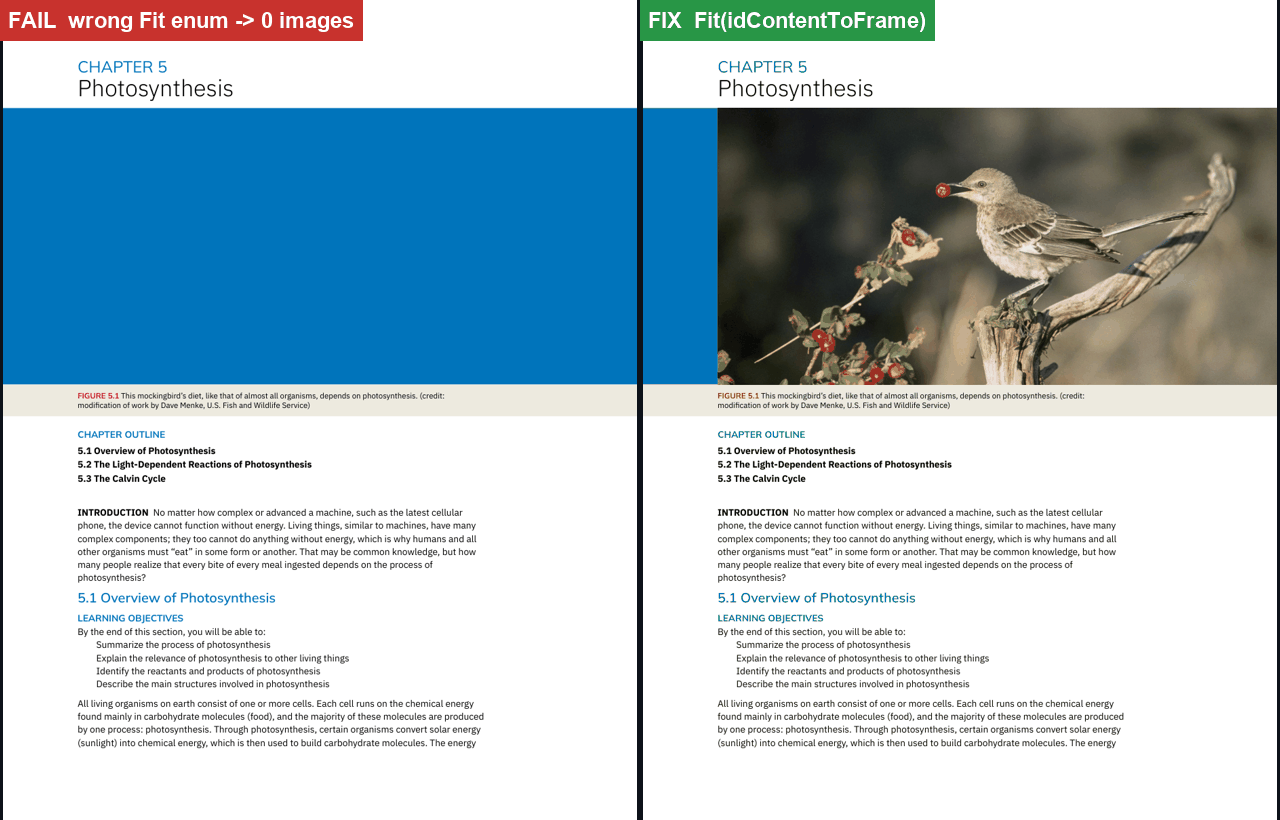
All seven images failed with a misleading “Invalid value”.
It wasn't Place() — it was Fit(idFitContentToFrame), the wrong enum group.
Fit(idContentToFrame) — image-IoU jumped to 98–100%.

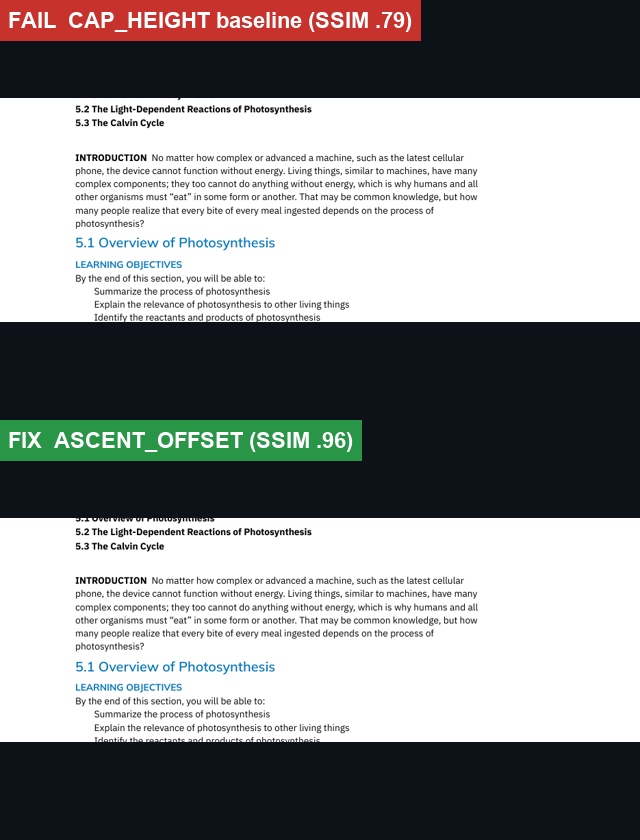
Identical logic scored SSIM 0.79 vs 0.96.
A CAP_HEIGHT baseline shifted every line up — PyMuPDF bboxes are ascender-derived.
ASCENT_OFFSET — match the baseline to the extractor's convention. Back to 0.96.

The suggested MCP repo was macOS-only; and the loop's first guess distorted the photo.
Built our own COM tool layer; the loop diagnosed the aspect and switched to fill-proportionally.
Composite still only moved 0.601 → 0.608 — use the loop for QA, not generation.

The title overflowed its placeholder (“Photosynthe-”); free-form structure couldn't be reproduced.
Pre-size slots; reframe the tool for templated jobs (catalogs, mail-merge) rather than arbitrary pages.
UXP has no global app; and the Gemini 2.0 judge returned 404 for our key.
require('indesign') for UXP; switched the judge to gemini-2.5-flash.
Hypothesis: stop placing one frame per line; build real paragraphs (threaded stories) and let InDesign reflow. Surely more faithful? The data said no.
⤢ zoom
⤢ zoomWhy it lost ~10 points: InDesign's composer re-breaks justified prose at different line endings than the original, so every body line lands slightly off (text-IoU fell 75 → 48). Grouping by block also fused distinct elements — the title wrapped wrong, the 5.1/5.2/5.3 outline collapsed into one paragraph, and “INTRODUCTION” lost its bold.
For faithful reproduction, per-span placement was already right — it reproduces the source's exact line breaks, which is the whole game. Threaded stories win when you want an editable, natural document, not a pixel match. It's a fidelity-vs-editability trade-off, not a ceiling you break by reflowing.
The genuine ways past 91% on this task lie outside our five tracks: a dedicated PDF→InDesign converter (Recosoft PDF2ID) that reconstructs matched stories, or Adobe's cloud InDesign API to break the headless limit.
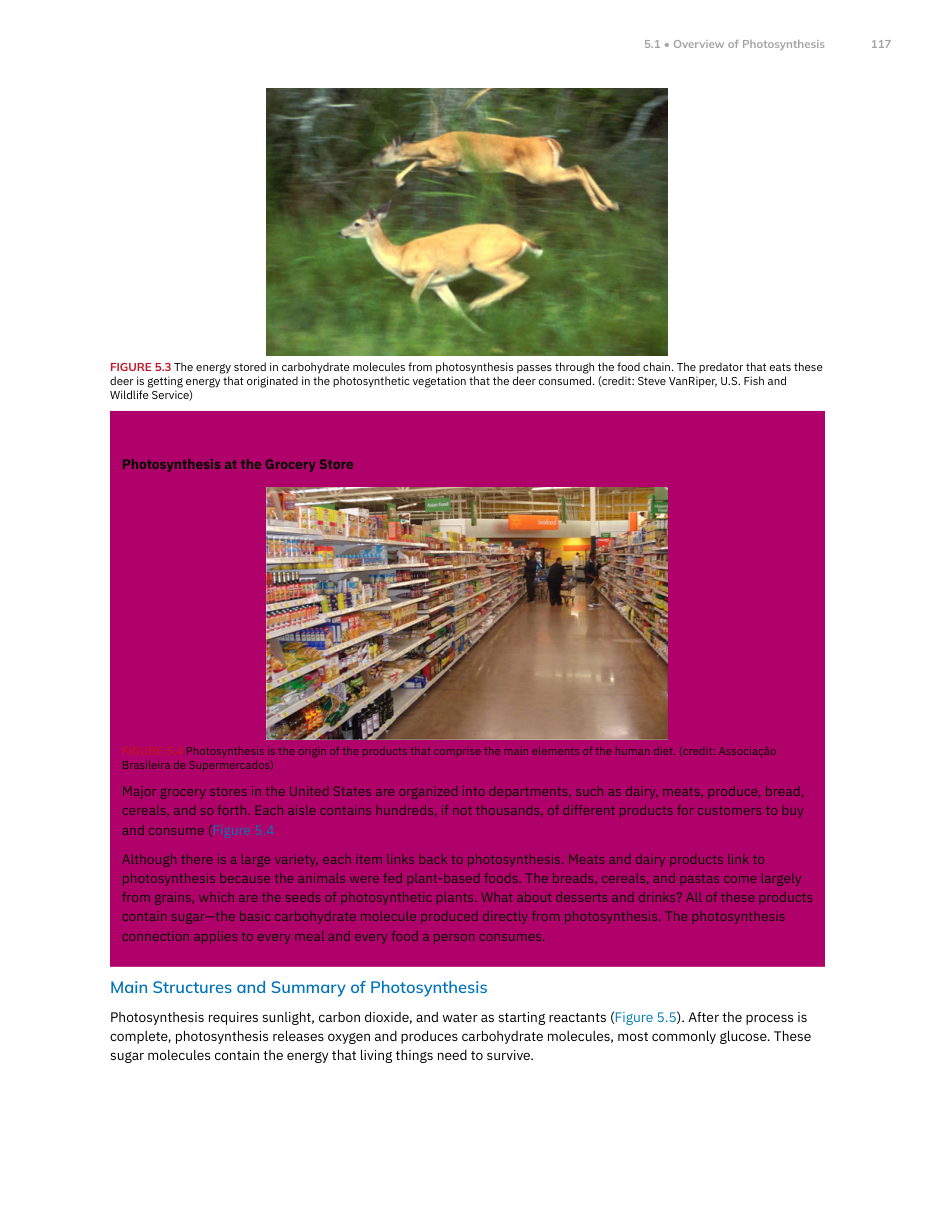
After the reflow experiment failed, the score sheet pointed at the real culprit: a single mis-rendered vector on page 3 — not the text at all.
⤢ zoom
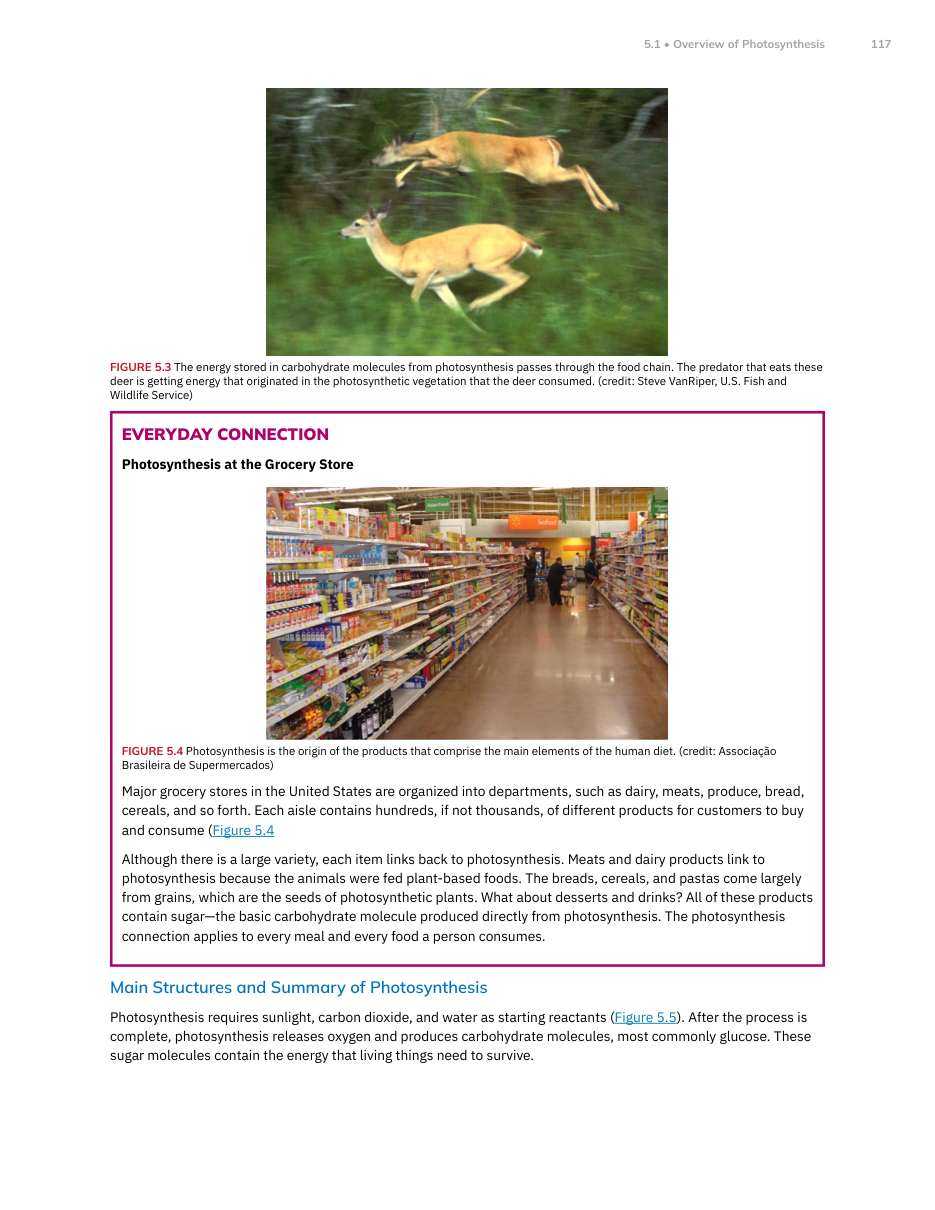
⤢ zoomThe diagnosis: the source's “Everyday Connection” box is a frame (an outer + inner rectangle filled with an even-odd rule). Our extractor had recorded it as one solid magenta fill and painted it over the grocery photo and text — wrecking page 3's colour (ΔE) and SSIM.
The fix (track B7): keep B1's exact per-span text and image placement, but re-classify every drawing — fills (header bars, tints), borders (frames → rendered as a stroke, not a block), and rules (thin bars). Page 3 jumped colour 63→100 and SSIM 0.875→0.994.
The gain wasn't in the text — it was one correctly-classified vector. Let the metrics tell you where the error actually lives before you “improve” anything.
Composite 90.9 → 93.3. With our own tools that's near the ceiling; beyond it lies Recosoft PDF2ID or Adobe's cloud InDesign API.
This is the real export from InDesign — scroll and zoom all five pages. Toggle to compare against the source.
Scored on a documented blend: SSIM · text-bbox IoU · colour ΔE2000 · image IoU · a Gemini vision judge.
| Track | Composite | Score | Pages |
|---|---|---|---|
| Precision pass (B7) | 93.3 | 5/5 | |
| PyWin32 COM | 90.9 | 5/5 | |
| ExtendScript | 90.9 | 5/5 | |
| UXP | 90.9 | 5/5 | |
| Block reflow (B6 · experiment) | 80.7 | 5/5 | |
| simpleidml | 59.6 | 1/5 | |
| MCP visual loop | 43.5 | 1/5 |
Image & fill placement (IoU 98–100), colour (ΔE<3), geometry, PDF/IDML export — once fonts and units are right.
Fonts (install the OFL families), per-span placement, the units & baseline conventions — fine once the gotchas are known.
Exact text reflow & line breaks, list formatting, the vision loop as a generator, free-form template-fill.
Extract with PyMuPDF → shared spec → generate via ExtendScript / COM / UXP. Reserve the loop for QA.
ExtendScript for the least setup, PyWin32 COM for a Python-native pipeline, UXP to ship — all three reach ~91% out of the box, and a one-fix precision pass lifts it to 93.3.
External automation? Viable via COM/AppleScript, but InDesign is not headless — volume needs the separate InDesign Server licence. That, not the API, is the gate.
The honest ceiling: ~93% / SSIM 0.994 with our own tools. Images and colour are solved; only sub-pixel text positioning remains — and two experiments (reflow, fit-to-width) proved that chasing it by distorting type makes things worse. Beyond this lies a dedicated converter (Recosoft PDF2ID) or Adobe's cloud InDesign API.