The assignment looked like a ten-minute integration: connect Claude Desktop to MATLAB, ask a question, and watch the tools light up. Instead it became an afternoon of licensing dead ends, installation traps, a hard reset, one crucial runtime lesson, and five experiments that escalated from a single sine wave to a deep fractal zoom.
This merged version keeps both original tellings in one place. It preserves the build-log narrative from the setup session and the quantitative record of what happened once the bridge existed.
I
Chapter I
The Assignment and First Contact
The directive came from Anand during a conversation about AI tools and professional software. The pattern was already established: Claude had been connected to Blender for 3D modeling and to ROS for robotics. The next question was whether that same pattern could stretch into engineering and mathematical computation through Claude Desktop.
"We are creating a series of environments, not just coding environments but other kinds of software, and seeing how coding agents can work with them."
— Anand S, during the initial briefing
Two directions were clear from the start. One was about making things easier: describe an engineering problem in plain English and let Claude assemble the solution. The other was about discovering new possibilities: use Claude Desktop to explore design spaces, generate novel simulations, and push toward results that would not have emerged from a static prompt alone.
The starting point was simple on paper: find an MCP server for MATLAB, or build one. The first discovery was encouraging. MathWorks had already published an official open-source MATLAB MCP Core Server on GitHub. The session notes record 269 stars, active development, a fresh v0.6.1 release, a Go-based binary distribution, and a .mcpb bundle designed to install into Claude Desktop with a double-click. The infrastructure, it seemed, was ready.
When the connection finally came alive, the very first question was the most basic one: What do I actually have to work with? The answer was stark. detect_matlab_toolboxes revealed MATLAB R2025b and Simulink, and nothing beyond that. No Control System Toolbox. No Signal Processing Toolbox. Just the raw engines. That constraint became the story, because every experiment that followed had to be built from first principles.
II
Chapter II
Five Walls Before the First Tool Call
What followed was not a demo reel. It was a debugging sequence: five distinct blockers, a different fix for each one, and the kind of setup narrative that usually disappears from polished product stories even though it defines the real experience of working with new tools.
W1
Licensing Error 9
MATLAB refused to start because the license was bound to a different Windows username. The active user, admin, was not authorized.
W2
Missing Activation Tool
The standard fix failed because activate_matlab.exe was missing from the expected path.
W3
No License Linked
The MathWorks License Center reported another dead end: the account was not currently linked to any licenses.
FIX
The Nuclear Option
The recovery path was a full uninstall and a fresh MATLAB R2025b install with a new trial license activated under the correct username.
W4
The .mcpb Bundle Did Not Install Cleanly
The promised double-click flow stalled, so the server had to be installed manually through Claude Desktop settings.
W5
MCP Could Not See MATLAB
MATLAB worked from the command line, but the MCP server still reported no installation because the PATH change had to live in the System PATH and be propagated into the server context.
The fixes were all different. The licensing issue demanded a reinstall. The discovery issue demanded a System PATH update rather than a User PATH edit. The bundle issue demanded a manual install route through Claude Desktop. Each wall fell in a different way, and each fix only became real after everything was restarted and tested again.
Claude Desktop · MATLAB MCP
What MATLAB toolboxes do I have installed?
-> detect_matlab_toolboxes
MATLAB 25.2 (R2025b)
Simulink 25.2 (R2025b)
That first successful tool call changed the shape of the session. The problem was no longer whether Claude could see MATLAB. The problem became whether it could do serious engineering work with only core MATLAB, Simulink, and one active conversational thread.
III
Chapter III
Five Simulations, One Thread
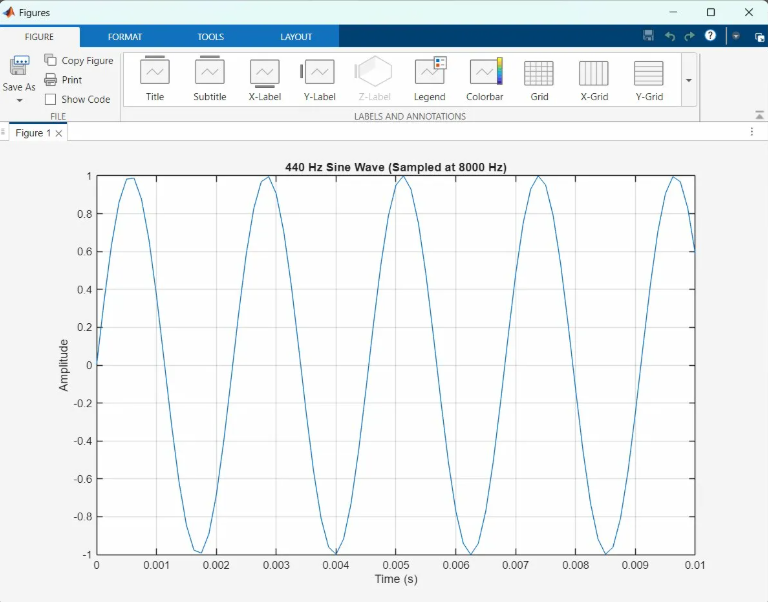
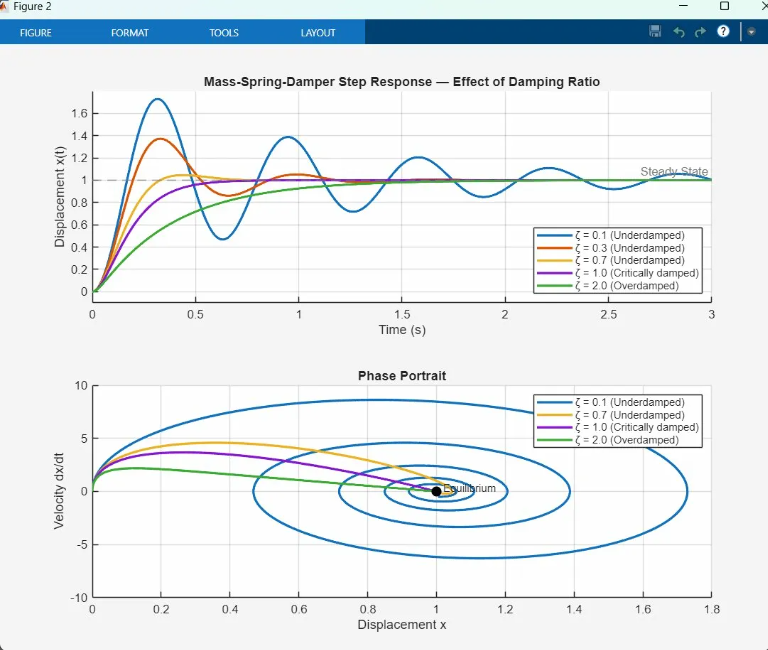
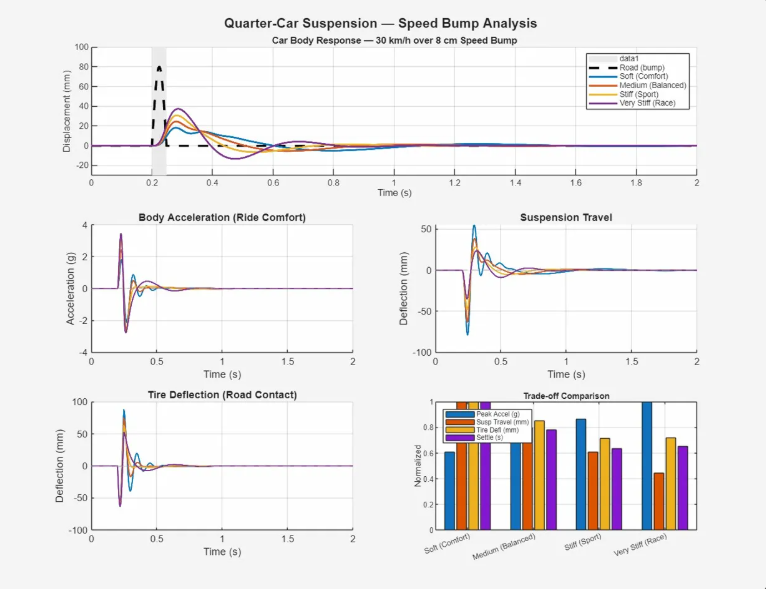
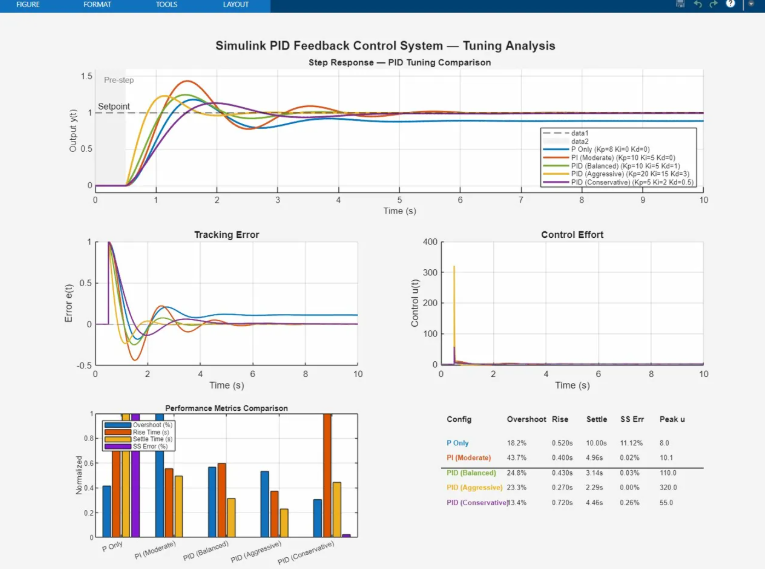
The experiment sequence followed a clear arc. Each simulation built on the intuition of the one before it: start with a single oscillation, move into classical mechanics, add coupled dynamics, step into closed-loop control, and finish with a piece of pure mathematical exploration.
IV
Chapter IV
Five Prompts, Five Worlds
What followed was a rapid escalation. Each prompt was about a sentence long. Each result was a full analysis that would normally take thirty minutes to an hour to code by hand, yet the session was driven entirely through Claude Desktop and the MATLAB bridge.
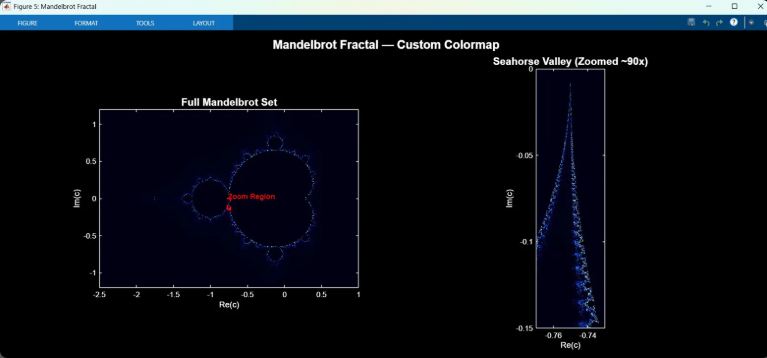
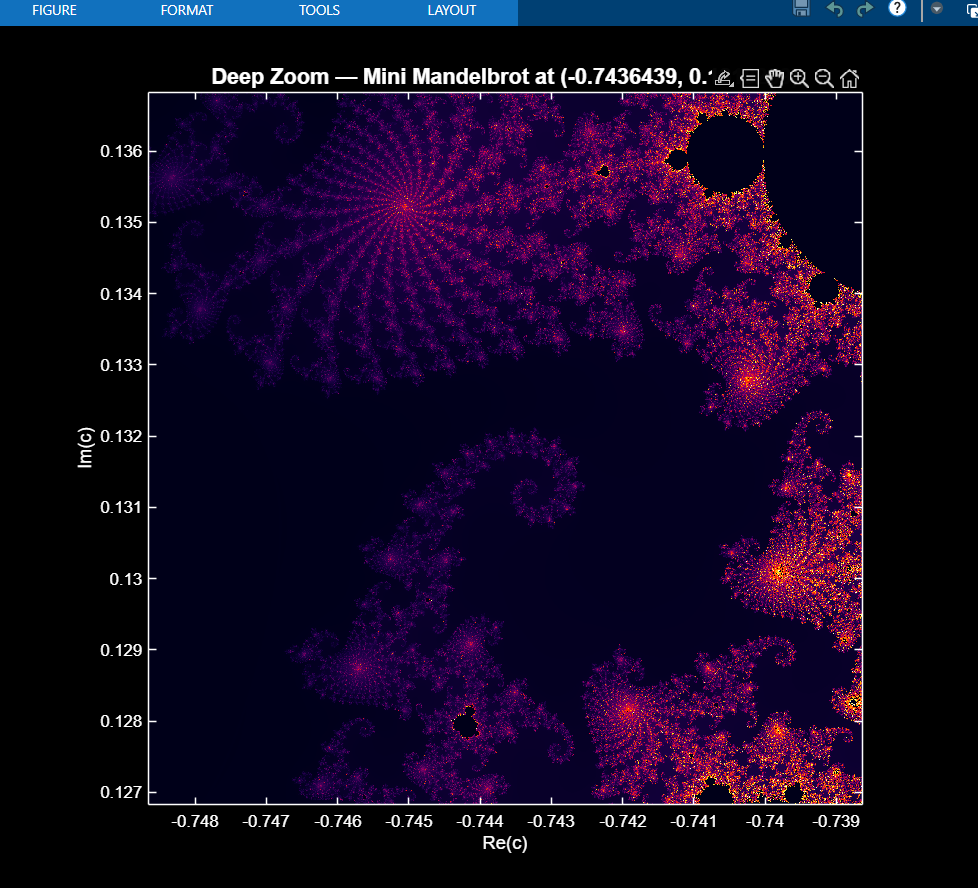
What started as a toolbox inventory ended with a Simulink model on disk and a fractal sequence that crossed 5.28 million rendered pixels. The session ran from the trivially analytical to the numerically intensive, then into control architecture, and finally into pure computation.
V
Chapter V
The Numbers and the Constraint
Each experiment pushed the computational footprint further: more state variables, more output, more iteration, and a wider spread between analytical and numerical methods. The quantitative summary from the second story is preserved below in full.
Not everything worked on the first try. The most important runtime lesson of the day was that evaluate_matlab_code behaves like script execution, not like running a saved function file. Helper functions defined at the end of the script with the usual function keyword were not reliably visible in that execution mode.
The fix was immediate and revealing: convert the helper logic into anonymous functions that live directly in the active workspace. Same mathematics, different packaging. That one change turned a failure into a clean run and mapped a real platform constraint that only surfaced because the code was being executed against a live system.
Session note reconciliation. The progression timeline marks the Simulink PID controller as the single failed-first-run experiment, while the preserved debugging example uses a qcar_dynamics helper from the suspension work. Both records are kept here because they point to the same practical lesson: under live evaluate_matlab_code execution, helper logic had to be rewritten as anonymous functions inside the active workspace.
VI
Chapter VI
The Bigger Picture
The MATLAB connection is the third in a larger pattern. Blender came first, with Claude driving 3D modeling workflows. Then came ROS and robotics. Now MATLAB and Simulink have extended that same idea into mathematical computation, engineering simulation, and control-system design.
Blender — 3D ModelingConnected
MATLAB — EngineeringConnected
The pattern is consistent: take professional software that normally demands months of syntax, tooling, and interface fluency, then collapse the distance between intention and execution with an MCP bridge. Claude Desktop does not replace the engineer. It gives the engineer a shorter path from idea to runnable artifact.
An engineer who already knows what a quarter-car model should look like can now get to the interesting part faster: the trade-offs, the tuning, the iteration. A student learning control theory can describe the behavior they want and see a PID controller respond without spending the whole session debugging semicolons and file structure.
"Making things easier is one. Discovering new possibilities is the other."
— Anand S, on the two directions for this work
The Mandelbrot sequence hints at the second direction. Claude did not just render what was asked. It recognized a meaningful zoom target, understood that the region had a name, and chose visual treatment that made the underlying structure legible.
That is the shift. Claude Desktop is not a macro recorder. It behaves more like a collaborator that understands both the software and the domain. The MATLAB MCP connection took an afternoon to build. The infrastructure it opens up could take years to explore. This was day one.